Writing processes
Process is a central building block of the Resolwe’s dataflow. Formally, a process is an algorithm that transforms inputs to outputs. For example, a Word Count process would take a text file as input and report the number of words on the output.
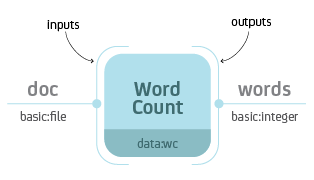
Word Count process with input doc of type basic:file and output
words of type basic:integer.
When you execute the process, Resolwe creates a new Data object with
information about the process instance. In this case the document and the
words would be saved to the same Data object. What if you would like
to execute another analysis on the same document, say count the number of
lines? We could create a similar process Number of Lines that would also take
the file and report the number of lines. However, when we would execute the
process we would have 2 copies of the same document file stored in the database.
In most cases it makes sense to split the upload (data storage) from
the analysis. For example, we could create 3 processes: Upload Document,
Word Count and Number of Lines.
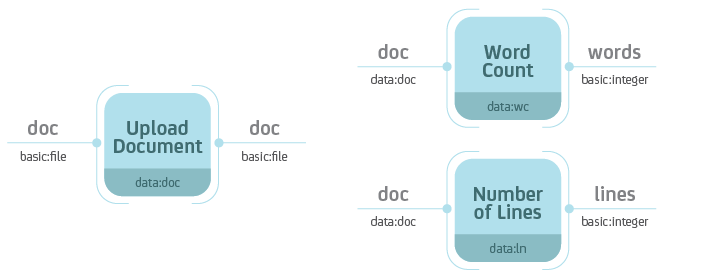
Separate the data storage (Upload Document) and analysis (Word Count,
Number of Lines). Notice that the Word Count and Number of Lines
processes accept Data objects of type data:doc—the type ot the
Upload Document process.
Resolwe handles the execution of the dataflow automatically. If you were to execute all three processes at the same time, Resolwe would delay the execution of Word Count and Number of Lines until the completion of Upload Document. Resolwe resolves dependencies between processes.
A processes is defined by:
Inputs
Outputs
Meta-data
Algorithm
Processes are stored in the data base in the Process model. A process’
algorithm runs automatically when you create a new Data object. The inputs
and the process name are required at Data create, the outputs are saved by
the algorithm, and users can update the meta-data at any time. The
Process syntax chapter explains how to add a process definition to the
Process data base model
Processes can be chained into a dataflow. Each process is assigned a type
(e.g., data:wc). The Data object created by a process is implicitly
assigned a type of that process. When you define a new process, you can specify
which data types are required on the input. In the figure below, the Word
Count process accepts Data objects of type data:doc on the input.
Types are hierarchical with each level of the hierarchy separated by a colon.
For instance, data:doc:text would be a sub-type of data:doc. A process
that accepts Data objects of type data:doc, also accepts Data
objects of type data:doc:text. However, a process that accepts Data
objects of type data:doc:text, does not accept Data objects of type
data:doc.
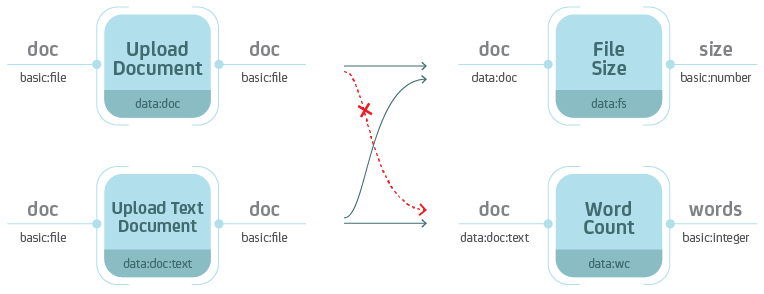
Types are hierarchical. When you define the type on the input, keep in mind that the process should also handle all sub-types.
Process syntax
A process can be written in any syntax as long as you can save it to the
Process model. The most straight-forward is to write it in Python, using
the Django ORM:
p = Process(name='Word Count',
            slug='wc-basic',
            type='data:wc:',
            inputs = [{
                'name': 'document',
                'type': 'basic:file:'
            }],
            outputs = [{
                'name': 'words',
                'type': 'basic:integer:'
            }],
            run = {
                'bash': 'WORDS=`wc {{ document.file }}\n`' +
                        'echo {"words": $WORDS}'
            })
p.save()
We suggest to write processes in the supported Python syntax. Resolwe includes a
register Django command that parses .py files in the processes
directory and adds the discovered processes to the Process model:
./manage.py register
Do not forget to re-register the process after you make changes to the .py
file. You have to increase the process version each time you register it. For
development, you can use the --force option (or -f for short):
./manage.py register -f
This is an example of the smallest processor in Python syntax:
 1from resolwe.process import Process
 2
 3class Minimal(Process):
 4    """A minimal example process."""
 5
 6    slug = "mini"
 7    name = "Minimalistic Process"
 8    process_type = "data:mini"
 9    version = "1.0.0"
10    requirements = {
11        "expression-engine": "jinja",
12    }
13
14    class Input:
15        """Input fields to process Minimal."""
16        pass
17
18    class Output:
19        """Output field of the process Minimal."""
20        pass
21
22    def run(self, inputs, outputs):
23        """Run the analysis."""
24        print("Hello bioinformatician!")
This is the example of the basic Word Count implementation in the Python
syntax (with the document file as input):
 1from resolwe.process import Cmd, IntegerField, Process, FileField
 2
 3class WordCount(Process):
 4    """A Word Count process."""
 5
 6    slug = "wc-basic"
 7    name = "Word Count"
 8    process_type = "data:wc"
 9    version = "1.0.0"
10    requirements = {
11        "expression-engine": "jinja",
12    }
13
14    class Input:
15        """Input fields to process WordCount."""
16        document = FileField(label="Document")
17
18    class Output:
19        """Output field of the process WordCount."""
20        words = IntegerField(label="Number of words")
21
22    def run(self, inputs, outputs):
23        """Run the analysis."""
24        input_doc = inputs.document.import_file()
25        num_words = int((Cmd["wc"]["-w"] < input_doc)())
26        outputs.words = num_words
If you would like to review the examples of the three processes mentioned above
(Upload Document, Word Count and Number of Lines), follow this
link. Read more about the process
options in Process schema below.
Process schema
Process is defined by a set of fields in the Process model. We will
describe how to write the process schema in YAML syntax. Some fields in the
YAML syntax have different name or values than the actual fields in the
Process model. See an example of a process with all fields. Fields in a process schema:
Field |
Short description |
Required |
Default |
|---|---|---|---|
unique id |
required |
||
human readable name |
required |
||
detailed description |
optional |
<empty string> |
|
version numbering |
optional |
||
data type |
required |
||
menu category |
optional |
<empty string> |
|
automatic grouping |
optional |
||
storage optimization |
optional |
RAW |
|
scheduling class |
optional |
batch |
|
list of input fields |
optional |
<empty list> |
|
list of result fields |
optional |
<empty list> |
|
the algorithm |
required |
||
requirements |
optional |
<empty dict> |
Slug
A unique identifier of the process. It should contain only alphanumeric characters, underscores or hyphens.
Name
A human-readable name for the process.
Description
Process description that explains what the process does. It can contain multiple lines and may be used in the GUI.
Version
Process version. It is used to track changes in the process. Each time you change the process, you should increase the version number. We suggest to use the semantic versioning scheme.
Type
Process type may contain alphanumeric characters separated by colon.
Category
The category is used to arrange processes in a GUI. A category can be any
string of lowercase letters, numbers, - and :. The colon is used to split
categories into sub-categories (e.g., analyses:alignment).
Entity
With defining the entity field in the process, new data objects will be
automatically attached to a new or existing Entity, depending on
it’s parents and the definition of the field.
entity field has 3 subfields:
typeis required and defines the type of entity that the newDataobject is attached toinputlimits the group of parents’ entities to a single field (dot separated path to the field in the definition of input)entity_always_createCreate new entity, regardless ofinputfield.
Persistence
Use RAW for data imports. CACHED or TMP processes should be idempotent.
Scheduling class
The scheduling class specifies how the process should be treated by the scheduler. There are two possible values:
BATCHis for long running tasks, which require high throughput.INTERACTIVEis for short running tasks, which require low latency. Processes in this scheduling class are processed in a separate processing
queue.
The default value for processes is BATCH.
Input and Output
A list of Resolwe Fields that define the inputs and outputs of a process. A Resolwe Field is defined as a dictionary of the following properties:
Required Resolwe Field properties:
name- unique name of the fieldlabel- human readable nametype- type of field (eitherbasic:<...>ordata:<...>)
Optional Resolwe Field properties (except for group):
description- displayed under titles or as a tooltiprequired- (choices: true, false)disabled- (choices: true, false)hidden- (choices: true, false)default- initial valuechoices- list of choices to select from (label,valuepairs)allow_custom_choice- (choices: true, false)
Optional Resolwe Field properties for group fields:
description- displayed under titles or as a tooltipdisabled- (choices: true, false)hidden- (choices: true, false)collapsed- (choices: true, false)group- list of process fields
Input and output fields are validated against the fieldSchema.json to ensure they conform to the expected structure and types.
Run
The algorithm that maps inputs to outputs is implemented in Python and runs
when a new Data object is created. Its execution environment, typically a
Docker container, is specified in the requirements field.
Requirements
A dictionary defining optional features that should be available in order for the process to run. There are several different types of requirements that may be specified:
expression-enginedefines the name of the engine that should be used to evaluate expressions embedded in therunsection. Currently, only thejinjaexpression engine is supported. By default no expression engine is set, so expressions cannot be used and will be ignored.executordefines executor-specific options. The value should be a dictionary, where each key defines requirements for a specific executor. The following executor requirements are available:docker:imagedefines the name of the Docker container image that the process should run under.
resourcesdefine resources that should be made available to the process. The following resources may be requested:coresdefines the number of CPU cores available to the process. By default, this value is set to1core.memorydefines the amount of memory (in megabytes) that the process may use. By default, this value is set to4096MiB.storagedefines the amount of temporary storage (in gigabytes) that the process may use. By default, this value is set to10GiB.networkshould be a boolean value, specifying whether the process requires network access. By default this value isfalse.
Types
Types are defined for processes and Resolwe Fields. Data objects have
implicitly defined types, based on the corresponding processor. Types define
the type of objects that are passed as inputs to the process or saved as
outputs of the process. Resolwe uses 2 kinds of types:
basic:data:
Basic: types are defined by Resolwe and represent the data building blocks.
Data: types are defined by processes. In terms of programming languages you
could think of basic: as primitive types (like integer, float or boolean)
and of data: types as classes.
Resolwe matches inputs based on the type. Types are hierarchical, so the same or more specific inputs are matched. For example:
data:genome:fasta:will match thedata:genome:input, butdata:genome:will not match thedata:genome:fasta:input.
Note
Types in a process schema do not have to end with a colon. The last colon can be omitted for readability and is added automatically by Resolwe.
Basic types
Basic types are entered by the user. Resolwe implements the backend handling (storage and retrieval) of basic types and GenBoard supports the HTML5 controls.
The following basic types are supported:
basic:boolean:(BooleanField) - booleanbasic:date:(DateField) - date (format yyyy-mm-dd)basic:datetime:(DateTimeField) - date and time (format yyyy-mm-dd hh:mm:ss)basic:decimal:(FloatField) - decimal number (e.g., -123.345)basic:integer:(IntegerField) - whole number (e.g., -123)basic:string:(StringField) - short stringbasic:text:(TextField) - multi-line stringbasic:url:link:(LinkUrlField) - visit linkbasic:url:download:(DownloadUrlField) - download linkbasic:url:view:(ViewUrlField) - view link (in a popup or iframe)basic:file:(FileField) - a file, stored on shared file systembasic:dir:(DirField) - a directory, stored on shared file systembasic:json:(JsonField) - a JSON object, stored in MongoDB collectionbasic:group:(GroupField) - list of form fields (default if nothing specified)
The values of basic data types are different for each type, for example:
basic:file: data type is a JSON dictionary: {“file”: “file name”}
basic:dir: data type is a JSON dictionary: {“dir”: “directory name”}
basic:string: data type is just a JSON string
Resolwe treats types differently. All but basic:file:,
basic:dir: and basic:json: are treated as meta-data.
basic:file: and basic:dir: objects are saved to the shared
file storage, and basic:json: objects are stored in PostgreSQL
json field. Meta-data entries have references to basic:file:,
basic:dir: and basic:json: objects.
Data types
Data types are defined by processes. Each process is itself a data:
sub-type named with the type attribute. A data: sub-type is defined by
a list process outputs. All processes of the same type should have the same
outputs.
Data type name:
data:<type>[:<sub-type>[...]]:
The algorithm
Algorithm is the key component of a process. The algorithm transforms process’s
inputs into outputs. It is written as a sequence of Python commands and supports
running the shell commands using the Cmd() utility. The algorithm is
executed when a new Data object is created.
To write the algorithm in a different language (e.g., R), just put it in
a file with an appropriate shebang at the top (e.g., #!/usr/bin/env
Rscript for R programs) and add it to the tools directory. To run it
simply call the script with appropriate arguments.
For example, to call the differential expression analysis using DESeq2, use:
from resolwe.process import Cmd

params = ["..."]

(Cmd["deseq.R"][params])()
Utility functions
Resolwe provides some convenience utilities for writing processes:
import_file()is a convenience function that copies/downloads a FileField object from the the source location to the working directory. temporary location, extracts/compresses it and moves it to the given final location. It takes three (optional) arguments:
imported_format: Import file format, which can be one of the following:
extract: to produce an extracted filecompress: to produce a compressed fileboth: to produce both compressed and extracted files
If this argument is not given, both the compressed and the extracted file are produced.
progress_from: Initial progress value (a number between 0.0 and 1.0)
progress_to: Final progress value (a number between 0.0 and 1.0)
The function returns the destination file path. If both extracted and compressed files are produced, the extracted path is returned.
Cmd()is a convenience function for running shell commands in the execution environment. It uses Python library Plumbum to run the given command.
from resolwe.process import Cmd

(Cmd["gzip"]["file.txt"])() # runs "gzip file.txt"
from resolwe.process import Cmd

args = ["-p", "index_dir", "refseq.fasta"]

return_code, _, _ = Cmd["bwa"]["index"][args] & TEE(retcode=None)
if return_code:
    # handle error
Runtime
Resolwe uses Docker containers as an execution environment for processes. The Resolwe toolkit base Docker images are built from Fedora and Ubuntu images. The base images include Resolwe Runtime Utilities that provide convenience functions for writing processes. The Resolwe toolkit images serve as a base images for building custom Docker images for specific processes. For example, the Resolwe bioinformatics processes use the Resolwe Docker images as their execution environment.
Inputs
Values stored in the process input fields can be accessed by referencing the
input objects attributes. For example, to access the process_type property
associated with the DataField input object, access its type attribute,
like this: input_object.type. DataField input object might store several
output fields, so you can access them by their names. For example, .bam file
associated with the alignment input object and stored in the bam output field
can be accessed by using inputs.alignment.output.bam.path.
Outputs
Processes have several options for storing the results:
as files (
FileField)as files in data object’s directory (
DirField)as constants in process’s output fields (i.e.
IntegerField,StringField, etc.)as entries in the Postgres data storage (i.e.
JsonField)
The values to be stored in the output fields are saved by the executed algorithm when assigned to the matching output field names, e.g.
outputs.bam = "alignment.bam"
outputs.bai = "alignment.bam.bai"
outputs.species = "Homo sapiens"
Note
Resolwe will automatically add files’ sizes to the
files’ size subfields.
Warning
After the process has finished, Resolwe will automatically check if all
the referenced files exist. If any file is missing, it will set the data
object’s status to ERROR. Files that are not referenced are
automatically deleted by the platform, so make sure to reference all the
files you want to keep!
Saving status
Status of the processing jobs can be set by modifying the following fields:
self.progress()field can be used to report processing progress interactively. You can set it to a value between 0 and 1 that represents an estimate for process’s progress.
self.error()Sets the error message for the process. Processing jobs with the status set to
ERRORwill be marked as failed. All processes that depend on this process will subsequently fail and their status will be set toERRORas well.self.warning()Sets the warning message for the process. Processing jobs with the status set to
WARNINGwill be marked as successful, but with warnings. All processes that depend on this process will be executed normally.self.info()Sets the info message for the process. Processing jobs with the status set to
INFOwill be marked as successful, but with additional info. All processes that depend on this process will be executed normally.
Relations between Entities (samples)
Entities (or samples) are a way to group data objects that belong together.
Entities are created automatically when a data object is created with a process
that has the entity field defined. See Entity above for more details
about the entity field.
A Relation encodes structured relationships between Entities within the same Collection, e.g. case-control pairing, time-series ordering, replicate sets. Relations are defined on a Collection and reference its member Entities.
To set the group relation of category type Replicate between Entities
associated with the Data object reads_1 and reads_2, use the
following example:
from resolwe.flow.models.entity import Relation, RelationPartition, RelationType

rel_type_group = RelationType.objects.get(name="group")

replicate_group = Relation.objects.create(
    contributor=self.contributor,
    collection=self.collection,
    type=rel_type_group,
    category="Replicate",
)

RelationPartition.objects.create(
    relation=replicate_group,
    entity=reads_1.entity,
    label="My sample",
)

RelationPartition.objects.create(
    relation=replicate_group,
    entity=reads_2.entity,
    label="My sample",
)
Metadata annotation model
Entity (sample) annotations store descriptive metadata as key-value pairs attached to an Entity, allowing you to record attributes such as tissue, condition, or experimental factors and to filter or group Entities for further analysis.
AnnotationField objects define individual annotation keys.
Each element specifies the name, data type, allowed values, and optional constraints
(e.g., a controlled vocabulary or required status). AnnotationField objects
ensure that annotation values remain consistent and validated across Entities.
AnnotationGroup elements let you organize related AnnotationField elements into
groups.
Values of the AnnotationField named species belonging to the AnnotationGroup
general can be managed from within a process using the following example syntax:
self.data.entity.annotations["general.species"] = "Homo sapiens"
Please refer to Resolwe SDK for Python documentation for details on how to annotate samples using the Resolwe Python SDK.